آلة صغيرة CNC: دليل كامل لفهم جوهرها وهيكلها المزيد
أما بالنسبة للمصنعين والهواة والمنتجين الصغار، فإن آلة التصنيع باستخدام الحاسب الآلي الصغيرة تشبه " مصنع سطح المكتب " - يقلل من قوة CNC الصناعية إلى أداة مدمجة وسهلة الاستخدام ، مما يتيح لأي شخص تحويل التصاميم الرقمية إلى أجزاء مادية. سواء كنت فضوليا حول ما هو، وكيف تم بناؤه، أو لماذا يهم، هذا الدليل ينقسم آلة CNC الصغيرة من 6 أبعاد أساسية، باستخدام لغة بسيطة لتفكيك تقنيتها وقيمتها.
الجزء الأول: الجوهر تعريف (ما هي آلة CNC الصغيرة؟)
في البداية، دعونا نوضح الأساسيات - ما الذي يجعل آلة صغيرة باستخدام الحاسب الآلي " . صغير" وكيف تختلف عن الأدوات الأخرى.
1-1 التعريف القياسي الطبيعة الأساسية
آلة تصنيع الحاسب الآلي الصغيرة (اختصار لـ " آلة التحكم الرقمي الكمبيوتر الصغيرة " ) هي أداة معالجة تصنيع الحاسب الآلي المدمجة منخفضة الطاقة المصممة للتصنيع على نطاق صغير. تكمن جوهرها الأساسي في سمتين رئيسيتين:
- مصغرة: حجمها للاستخدام على سطح المكتب / المقعد (عادة ≤1 متر مكعب ، وزنه 5-50 كجم) - أصغر بكثير من آلات CNC الصناعية (التي تملأ غرف بأكملها).
- إمكانية الوصول: يعمل على الطاقة المنزلية القياسية (110 فولت / 220 فولت) ، ويستخدم برامج بسيطة ، ويتطلب الحد الأدنى من الإعداد - مما يقلل من الحاجز أمام الهوايات والطلاب والشركات الصغيرة.
فهي لا تزال في جوهرها أداة تعمل باستخدام الحاسب الآلي: فهي تتبع برامج مسبقة " . رمز G" (تعليمات قابلة للقراءة بالآلة) لقطع أو نحت أو تشكيل المواد بدقة - تم تقليصها للاستخدام الشخصي.
1.2 الحدود: كيف تختلف عن الأدوات المماثلة
من السهل خلط آلات CNC الصغيرة مع أجهزة CNC الصناعية أو الطابعات ثلاثية الأبعاد أو الأدوات اليدوية. إليك التمييز الواضح:
| نوع الأداة | آلة صغيرة CNC | آلة CNC الصناعية | طابعة ثلاثية الأبعاد | أداة الطحن اليدوية |
|---|---|---|---|---|
| الحجم & الوزن | سطح المكتب / مقعد (≤1m³ ، 5-50kg) | على نطاق المصنع (≥10m³، 500 + كجم) | سطح المكتب / سطح المقعد (حجم مماثل) | يدوي / مقعد (صغير ، ولكن يدوي) |
| الطاقة & السرعة | طاقة منخفضة (50-500W) ، بطيئة متوسطة | قوة عالية (1-10kW) ، سريعة | الطاقة المنخفضة (50-300W) ، بطيئة | مدعومة بالبشر، سرعة متغيرة |
| طريقة المعالجة | الخصم (يزيل المواد) | الخصم (يزيل المواد) | إضافة (يبني طبقة طبقة) | الخصم (إزالة يدوية) |
| أفضل ل | أجزاء صغيرة (خشب، بلاستيك، معدن رقيق) | أجزاء كبيرة/ثقيلة (معدن سميك، مركبات) | أشكال ثلاثية الأبعاد المعقدة (البلاستيك، الراتنج) | أجزاء بسيطة لمرة واحدة (دقة منخفضة) |
الفرق الرئيسي:يملأ آلة CNC الصغيرة " الأرض الوسطى" هو أكثر دقة من الأدوات اليدوية، وأكثر دمجا من CNC الصناعية، وأفضل للمواد الصلبة (مثل الخشب والألومنيوم) من الطابعات ثلاثية الأبعاد (التي تكافح مع المواد الصلبة).
1.3 الميزات الرئيسية & معايير القياس
يجب أن يكون لديها ميزات آلة صغيرة CNC:
- بصمة صغيرة: يناسب على مكتب منزلي أو مقعد ورشة عمل (على سبيل المثال، 50 سم × 40 سم × 30 سم) - لا حاجة إلى مساحة إضافية.
- إعداد Plug-and-Play: تأتي معظمها مجتمعة مسبقاً (أو تتطلب 1-2 ساعة من التجميع البسيط) وتعمل مع منافذ المنزل القياسية.
- متعددة الوظائف: يدعم القطع والحفر والطحن والحفر (للمواد مثل الخشب الرقائقي والأكريليك والألومنيوم 1-3mm).
- برنامج سهل الاستخدام: يعمل مع أدوات صديقة للمبتدئين (على سبيل المثال، Easel، Fusion 360 للمبتدئين) - لا تحتاج إلى خبرة CNC متقدمة.
المعلمات الحرجة لتقييم الأداء:
- منطقة العمل (حجم السرير): الحد الأقصى لحجم المواد التي يمكن معالجتها (على سبيل المثال ، 300 مم × 200 مم × 50 مم طول × عرض × ارتفاع).
- سرعة المغزل: كم سرعة تدور أداة القطع (1000-10000 دورة في الدقيقة للنماذج الصغيرة؛ أعلى = قطع أكثر سلاسة على المواد الصلبة).
- دقة تحديد الموقع: مدى دقة تحركها (عادة ± 0.1 مم للنماذج المبتدئة ؛ ± 0.05 مم للصغيرة CNC الراقية).
- قوة المغزل: يحدد المواد التي يمكن قطعها (50-200 واط = خشب / بلاستيك؛ 300-500 واط = معدن رقيق مثل الألومنيوم).
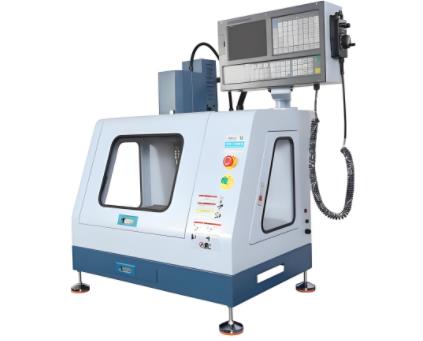
الجزء الثاني: الهيكل التكوين (من ماذا هو مصنوع؟)
آلة CNC الصغيرة هي نظام وحدات - كل جزء لديه وظيفة محددة ، ويعملون معا لتحويل الشفرة إلى أجزاء. دعونا نحطم مكوناتها وكيفية اتصالها.
2-1 المكونات الأساسية وحدات فرعية
كل آلة صغيرة CNC لديها 5 مكونات أساسية ، كل منها مع أجزاء فرعية أصغر:
| مكون | وحدات فرعية | وظيفة |
|---|---|---|
| 1. وحدة تحكم CNC | - اللوحة الرئيسية (على سبيل المثال، أردوينو، GRBL القائمة) | " الدماغ" يقرأ رمز G، ويرسل إشارات إلى المحركات، ويتحكم في سرعة المغزل. |
| - HMI (واجهة الإنسان والآلة) | شاشة صغيرة / لوحة زر لبدء / إيقاف الوظائف ، ضبط السرعة ، أو توقف. | |
| 2. نظام المغزل | - محرك المغزل (DC / AC) | يدور أداة القطع (بت الطحن، إبرة النقش) في RPM المحددة. |
| - أداة تشاك / كوليت | يحمل أداة القطع بقوة (يمنع التذبذب أثناء المعالجة). | |
| - تبريد المغزل (مروحة / الهواء) | يبرد المحرك (معظم النماذج الصغيرة تستخدم مروحة بسيطة - لا تبريد سائل). | |
| 3. آلية الحركة | - محركات خطوة (محور X / Y / Z) | يحرك المغزل أو طاولة العمل على طول 3 محاور (خطوة = بأسعار معقولة ، دقيقة بما فيه الكفاية للاستخدام المصغر). |
| - دليل خطي / شرائح السكك الحديدية | يضمن حركة سلسة ومستقرة (يقلل من الاهتزاز لقطع أنظف). | |
| - مسامير الرصاص / محركات الحزام | يترجم دوران المحرك إلى حركة خطية (مسامير الرصاص = دقة أعلى؛ الأحزمة = سرعة أسرع). | |
| 4. طاولة العمل | - نظام التشديد (مقاطع / فراغ الوسادة) | يحمل المواد في مكانها (مقاطع للخشب / البلاستيك ؛ وسائد الفراغ الصغيرة للأوراق الخفيفة الوزن). |
| - مادة السرير (الألومنيوم / الأكريليك) | سطح مسطح جامد (الألومنيوم = متين؛ الأكريليك = صديق للميزانية). | |
| 5. نظام البرمجيات | - برنامج CAD (مثل Tinkercad) | يسمح للمستخدمين بتصميم أجزاء ثنائية الأبعاد / ثلاثية الأبعاد (أدوات صديقة للمبتدئين). |
| - برنامج CAM (على سبيل المثال، إيزل) | يحول تصاميم CAD إلى رمز G (تعليمات قابلة للقراءة بالآلة). |
2-2 الهيكل التسلسل الهرمي: كيف تعمل المكونات مع بعضها البعض
تعمل آلة CNC الصغيرة في تسلسل بسيط ومطبق - لا يعمل أي جزء لوحده:
- طبقة الأوامر: يتلقى وحدة التحكم CNC رمز G (من برنامج CAM) ويترجمه إلى إشارات كهربائية.
- طبقة الحركة: تحرك المحركات الخطوة (مدفوعة بواسطة وحدة التحكم) المغزل على طول محاور X / Y / Z ، اتباع مسار رمز G.
- طبقة المعالجة: The spindle motor spins the cutting tool (e.g., a 3mm milling bit) at set RPM, removing material from the workpiece.
- Support Layer: The worktable’s clamps hold the material steady, while the spindle fan keeps the motor cool.
مثال: If you’re engraving a wooden keychain, the controller tells the spindle to move in a "keychain shape" (X/Y axes), the spindle spins at 8,000 RPM, and the clamps keep the wood from sliding—all while the fan prevents the spindle from overheating.
Part 3: Origin & Evolution (Where Did It Come From?)
The mini CNC machine didn’t appear overnight—it evolved from industrial CNC tech, driven by a desire to make manufacturing accessible to everyone.
3.1 Origin: Birth Background & Creators
- Pre-Mini Era (1950s–2000s): CNC machines were exclusively industrial—used by car factories and aerospace companies. They were huge, expensive (>$100,000), and required trained technicians to operate.
- The "Maker Movement" Spark (2000s–2010s): In the 2000s, the maker movement (a global trend of DIY manufacturing) took off. Hobbyists and tinkerers wanted a way to make small parts at home, but industrial CNCs were out of reach.
- First Mini CNCs (2010–2015): The first consumer-friendly mini CNCs emerged from open-source projects and small startups. For example:
- Shapeoko (2011): A DIY mini CNC kit from Carbide 3D—users assembled it themselves, and it worked with open-source software (GRBL). It cost ~$1,000, a fraction of industrial CNCs.
- CNC Shark (2012): From Next Wave Automation—pre-assembled, with beginner software, targeting hobbyists who didn’t want to build from scratch.
These early models solved a critical problem: making CNC technology accessible to people without factory budgets or technical training.
3.2 Evolution: Key Stages & Driving Forces
The mini CNC machine has evolved in 3 key stages, driven by user needs and tech advancements:
| Stage (Time) | Key Improvements | Driving Force |
|---|---|---|
| 1. DIY Kit Era (2010–2015) | Basic 2-axis/3-axis movement; manual assembly; limited software (GRBL only). | Demand for affordable CNC (makers wanted to save money by building kits). |
| 2. Plug-and-Play Era (2016–2020) | Pre-assembled machines; user-friendly software (e.g., Easel); better precision (±0.1mm). | Hobbyists wanted less setup time—"unbox and use" became a priority. |
| 3. Smart/Integrated Era (2021–Present) | Wi-Fi connectivity (remote control); multi-material support (thin metal); AI-assisted error detection. | Makers needed versatility (cut wood and aluminum) and convenience (control via phone). |
Key Drivers:
- Electronics Miniaturization: Stepper motors and controllers got smaller/lighter (e.g., Arduino-based boards) without losing precision.
- Open-Source Software: Tools like GRBL and Easel removed software costs—users didn’t need to pay for expensive industrial CAD/CAM tools.
- User Demand for Versatility: Makers wanted one tool to engrave, cut, and drill—so manufacturers added stronger spindles and better clamping.
Part 4: Environment & Relationships (Where Does It Fit?)
The mini CNC machine doesn’t exist in a vacuum—it’s part of a larger ecosystem of tools, materials, and users. Let’s map its place in this network.
4.1 External Environment: Where It Operates & Constraints
Typical Operating Environments:
- Home Workshops: Most common—fits on a desk, runs on 220V (household power), and works for hobby projects (e.g., wooden coasters, acrylic signs).
- Maker Spaces: Shared workshops (e.g., TechShop) use mini CNCs to teach beginners and let members make small parts.
- Schools/Colleges: Used in STEM classes to teach students about CNC, design, and manufacturing (safer and cheaper than industrial models).
Environmental Constraints:
- Space: It needs a flat, stable surface (no larger than a laptop desk)—too small a space causes vibration (ruining cuts).
- Power: Requires standard household power (110V/220V)—industrial 3-phase power isn’t needed, but voltage fluctuations can damage the controller.
- Noise: Spindle motors make ~50–70dB (like a vacuum cleaner)—not ideal for apartments (users often add sound dampeners).
- Dust/Debris: Cuts create sawdust or plastic shavings—needs a small vacuum or dust collection bag to keep the workspace clean.
4.2 Related Things & Roles in the Ecosystem
The mini CNC machine is a "connector"—it links upstream suppliers, downstream users, and complementary tools:
| Relationship Type | Related Technologies/Materials | Role of Mini CNC Machine |
|---|---|---|
| Upstream | - Materials: Plywood, acrylic, thin aluminum (1–3mm) | "Customer": Relies on small, easy-to-source materials (no industrial-grade metal). |
| - Consumables: Milling bits (1–10mm), engraving needles | "Dependent": Uses cheap, widely available consumables (e.g., $5 per milling bit). | |
| - Software: Tinkercad, Easel, Fusion 360 (free tiers) | "Partner": Works with free/budget software to lower user costs. | |
| Downstream | - Hobbyists/Makers: Make custom parts (e.g., drone frames, guitar picks). | "Tool": Turns their designs into physical objects—no need to outsource. |
| - Small Businesses: Produce small-batch goods (e.g., custom keychains, jewelry). | "Production Helper": Avoids industrial CNC costs for low-volume orders. | |
| - Students: Learn CNC basics and design thinking. | "Educational Tool": Safe, hands-on way to teach manufacturing concepts. | |
| Complementary | - 3D Printers: Mini CNCs cut hard materials; 3D printers build complex 3D shapes. | "Team": Together, they cover most small-scale manufacturing needs. |
| - Laser Engravers: Laser = fast, fine engraving; mini CNC = deeper cuts (e.g., 5mm wood). | "Alternative": Users choose based on material (laser for paper/plastic; CNC for wood/metal). | |
| Substitutes | - Manual Milling Tools: Cheaper, but less precise; mini CNC = faster, more consistent. | "Upgrade": For users who want precision without manual effort. |
Ecosystem Role: The mini CNC machine is the "gateway to manufacturing"—it lets non-experts (hobbyists, students) access CNC technology, bridging the gap between digital design and physical creation.
Part 5: Function & Role (What Is It Used For?)
The mini CNC machine’s value lies in solving real problems for its users—let’s break down what it does and why it matters.
5.1 Core & Secondary Functions
Core Function (Why It Was Built):
Small-Scale Subtractive Manufacturing: It cuts, carves, or mills small pieces of material (wood, plastic, thin metal) into custom shapes. This solves a big problem: before mini CNCs, hobbyists had to either buy pre-made parts (limited options) or pay industrial shops to make small batches (expensive).
Examples of core use cases:
- A maker cutting acrylic parts for a DIY robot.
- A small jewelry business engraving names on aluminum pendants.
- A student milling a wooden prototype for a school project.
Secondary/Derived Functions:
- الحفر: Creates precise holes (1–10mm) in materials (e.g., drilling holes in a wooden phone stand).
- Marking: Engraves text or logos (e.g., adding a brand name to a leather notebook cover).
- Prototyping: Rapidly tests small designs (e.g., a startup making 5–10 plastic prototypes of a new gadget before mass production).
5.2 Impact & Value (Positive & Negative)
Positive Impacts:
- For Makers/Students: Lowers the "manufacturing barrier"—anyone with a laptop and $500 can start making custom parts. It also teaches valuable skills (design, CNC, problem-solving) that are useful in STEM careers.
- For Small Businesses: Reduces production costs—small shops don’t need to outsource small-batch orders (e.g., a custom sign shop can make 20 wooden signs in-house instead of paying a factory).
- For Innovation: Lets tinkerers test ideas quickly—many startups (e.g., small drone companies) used mini CNCs to build early prototypes before scaling up.
Negative Impacts:
- Limitations on Materials/Sizes: It can’t cut thick metal (only 1–3mm aluminum) or large parts (max work area ~500mm × 500mm)—industrial CNCs are still needed for big projects.
- Consumable Costs: Milling bits wear out (after 10–20 hours of use) and need replacement—adds up over time (e.g., $50–$100 per year for frequent users).
- Learning Curve: While simpler than industrial CNCs, it still requires learning CAD/CAM software—beginners may need 1–2 weeks to master basic cuts.
Key Value:
The mini CNC machine’s greatest value is "manufacturing democratization"—it takes a tool once reserved for factories and puts it in the hands of ordinary people,turning "I have an idea" into "I made this" without big budgets or expertise.
Part 6: Operation & Principle (How Does It Work?)
Understanding how a mini CNC machine operates doesn’t require advanced engineering—let’s break it down into simple steps and basic science.
6.1 Operation Mechanism & Workflow
A typical mini CNC project follows 5 steps (input → processing → output):
- Step 1: Design (Input: Digital File)
- Use CAD software (e.g., Tinkercad for beginners) to draw a 2D/3D design of your part (e.g., a wooden coaster with a pattern).
- Save the design as a standard file (e.g., .SVG for 2D, .STL for 3D)—this is the "blueprint" for the machine.
- Step 2: Convert to G-Code (Processing: Translate Design)
- Import the CAD file into CAM software (e.g., Easel). The CAM tool asks for details:
- Material (e.g., 6mm plywood).
- Cutting tool (e.g., 3mm milling bit).
- Depth of cut (e.g., 2mm per pass).
- The CAM software converts this into G-code—a list of numerical commands (e.g., "G01 X10 Y20 F500" = move to X=10mm, Y=20mm at 500mm/min speed) that the machine can understand.
- Import the CAD file into CAM software (e.g., Easel). The CAM tool asks for details:
- Step 3: Machine Setup (Prepare for Cutting)
- Secure the material to the worktable (use clamps or a vacuum pad—make sure it doesn’t move).
- Install the cutting tool (e.g., insert a 3mm milling bit into the spindle’s collet and tighten it).
- "Zero" the machine: Use a probe or manual adjustment to tell the controller where the material’s origin (0,0,0 point) is—this ensures the cut starts in the right place.
- Step 4: Run the Job (Processing: Cut the Material)
- Load the G-code into the CNC controller (via USB, Wi-Fi, or SD card).
- Press "Start"—the controller sends signals to the stepper motors, which move the spindle along X/Y/Z axes.
- The spindle motor spins the cutting tool at set RPM (e.g., 8,000 RPM for wood), removing material layer by layer until the design is complete.
- Most machines have a "pause" button—use it if you notice vibration or a loose tool.
- Step 5: Finish the Part (Output: Physical Object)
- Once the job ends, turn off the spindle and remove the material.
- Clean up: Sand any rough edges (from cutting) or wipe away sawdust/plastic shavings.
- You now have a physical part that matches your digital design!
6.2 Underlying Principles & Laws
The mini CNC machine works thanks to 3 basic scientific and technical principles—no complex math required:
- Numerical Control (CNC) Principle
- At its core, CNC is about "translating numbers into motion." The controller reads G-code (numbers that represent position, speed, and tool action) and converts it into electrical signals for the motors. This ensures precision—the machine moves to exactly the right spot every time, unlike manual tools (which depend on human hand-eye coordination).
- Stepper Motor Principle
- Mini CNCs use stepper motors (not the servo motors in industrial CNCs) because they’re cheap and precise enough for small jobs. A stepper motor moves in tiny, fixed "steps" (e.g., 0.01mm per step). The controller tells the motor how many steps to take along each axis—this is how the spindle moves to the correct X/Y/Z position.
- Subtractive Manufacturing Principle
- Unlike 3D printers (which add material layer by layer), mini CNCs use "subtraction": they remove material from a solid block (e.g., a piece of wood) to create the desired shape. This works because the cutting tool (milling bit) is harder than the material—so it shaves off small pieces until the block matches the design.
أفكار نهائية
The mini CNC machine is more than a tool—it’s a way for anyone to become a "maker." It takes the complexity of industrial manufacturing and shrinks it into a desktop device, letting hobbyists make custom parts, students learn STEM skills, and small businesses build products without big budgets.
If you’re just starting out, focus on the basics: pick a pre-assembled model (to avoid DIY frustration), learn simple CAD/CAM software (like Tinkercad and Easel), and start with easy materials (wood or acrylic). As you get comfortable, you’ll find endless ways to use it—from making gifts to prototyping your next big idea.